
When a new user signs up for 30 day trial their details will be imported into Accredo and you can generate a report of these users in the following area using the filters ticked.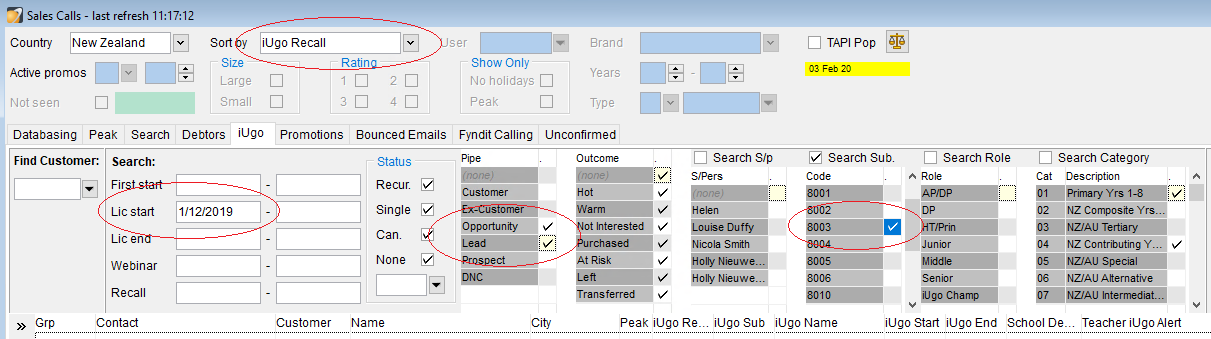
Click on the name in the list that populates to open the school and contact details. The school will open and you will see a list of users - click on the teachers name and open the 'contact' tab. Call their cellphone number preferably or the school number if this isn't available.
These teachers can be called in off-peak times such as before school, morning tea, lunchtime, and after school.
The main goal of these calls are:
1. Build a relationship and built rapport so the user knows they can speak to a real person.
2. Highlight iUgo's benefits by delving further into their preferences, teaching situation, and current planning tool.
3. Encourage the use of planning on iUgo and offer personalised support to convert the trial into a subscription.
Below is the general process to follow and how to respond and set recalls according to if the teacher answers the phone or not.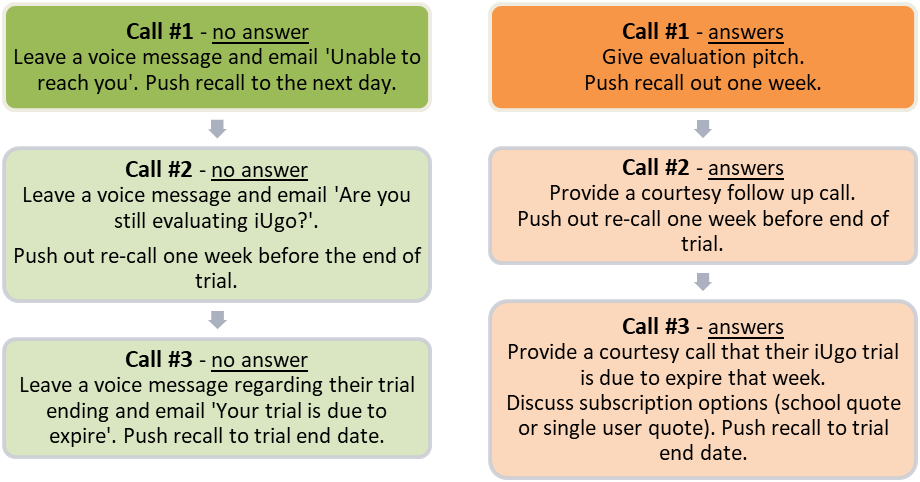
Evaluation pitch:
Hi it’s _________ from iUgo the online teacher planner, how are you?
I wanted to give you a quick call about your trial, do you have a moment?
Wonderful, I wanted to let you know that your trial has been created and you should now be able to sign in - you also would have received a welcome email from us, did that come through?
Have you had a chance to sign in and have a look at iUgo?
When you get the chance, we have loaded support guides into your account it’s on the right-hand side of each tool in iUgo. This will provide an overview of what the tool can be used for and interactive walkthrough's, videos, and guides.
Are you looking for a solution for yourself or for the school?
*If a school solution – mention online webinar if the school/team would like a highlights tour of the program.
Do you plan independently or collaborate/share planning?
*Mentioned that iUgo is user friendly in both teaching environments where you can work on all your own planning or work together on one plan. For collaborating teachers – mention that you can share classes, groups and resources.
What do you currently use for planning?
*Google docs is the most popular response – be sure to mention that we have integration with google docs. Office 365 is not integrated but if they have it installed on their desktop they can access resources from 365 straight from their lesson plans. If they are paper planning it is worth mentioning that you can store all of your planning as PDF documents or print them out (they will be transitioning from paper to online and can give them peace of mind that they won’t lose planning).
Do you have any questions I could help with for the meanwhile?
Lovely, I’ll send you an email with my contact details and if anything comes up please feel free to reply back or phone us.
Have a lovely day.
Voice message:
Hi there, it’s _____ from iUgo the online teacher planner, I wanted to give you a quick courtesy call about your trial. I’ve sent an email with more information about our support. Please feel free to reply back to this or phone us on (AU or NZ phoneline).
Trial Expiry (answers and voice message):
Hi it’s ________ from iUgo the online teacher planner, how are you?
I wanted to give you a quick courtesy call as your free iUgo trial is due to end this week. I wanted to follow up to see how you were getting on and if I could offer any further support. (I've sent you an email with more details about setting up a subscription, please feel free to reply back or phone us on (AU or NZ phoneline)).
Email templates (click on drive link to open)
NZ
Follow up opportunity
Unable to reach you
Are you still evaluating iUgo?
Your iUgo trial is due to end soon
AU
Follow up opportunity
Unable to reach you
Are you still evaluating iUgo?
Your iUgo trial is due to end soon