
Hi all
I’ve made some changes to return label generation/printing from the invoice detail which should be useful.
- Resending a return label is now enabled for all return labels. I’ve found a new web API which allows conversion of a Zebra ZPL printer language file to PDF, so have added in logic to handle this conversion automatically if you request a label. This means that the scenario of grumpy accounts person calling and wanting to return when the teacher has not passed on/lost/destroyed the label is now easier to handle.
- New option to Reprint Return Label if it has already been saved as ZPL. Scenario for this is accidentally putting the label on the box in dispatch (I’m not naming names!) or otherwise having it not available. You can still regenerate it by scanning if the invoice is unposted, but this gives you a wee bit more flexibility and was a very simple change.
Just a reminder these are both in the invoice/transaction view, arrow in a green circle  on the invoice, invoice list, print list or the open button on the debtors tab.
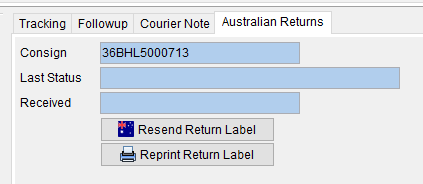
Limitations:
- The ZPL conversion to PDF is at the thermal printer resolution (203 dpi) so black and white and looks a little scratchy on-screen. This is about the best we can do as that’s all the information in ZPL.
- You can’t reprint a return label with this button that was only ever generated as PDF – normally that means head office emailed after the event, so I don’t see it being a problem. If you wanted hard copy, you can use the “resend return label” to email the PDF and print normally using Adobe.
Thanks
Andrew Joll BCom CA